From Zero to Hero: Your Ultimate Guide to Getting Discovered on Google Search
A Quick Introduction
In today’s digital age, if you’re not on Google, you’re practically invisible. Whether you’re a budding entrepreneur, a freelance professional, or a small business owner, getting found online is the first step toward success. But how exactly do you “add me to Google Search” and ensure your presence shines through the digital noise?
Many of you might be asking: “How do I add myself on Google?” or “How do I add my name in Google Search?” This comprehensive guide from Digify Ads will walk you through every single step, from the absolute basics to advanced strategies, making sure you not only appear on Google but thrive there.
Let’s dive in and transform your online visibility!
What Does "Add Me to Search" Really Mean for You?
When you hear “add me to search,” it often refers to creating a “People Card” on Google. Think of this as your personal digital business card that appears when someone searches for your name. This feature allows individuals to add me to Google with key personal information like your name, profession, location, and links to your website or social media profiles.
But “add me to search on Google” isn’t just about People Cards. For a business or a professional looking for broader visibility, it encompasses a much wider strategy. It’s about ensuring your website, services, and expertise are easily discoverable by your target audience. It’s about answering the question, “How to add information on Google?” in a way that maximizes your reach.
Why Is Getting Found on Google So Crucial?
Imagine opening a new store, but no one knows where it is. That’s what having a website without Google visibility feels like. Here’s why it’s a game-changer:
- Credibility and Trust: When your business appears prominently in search results, it instantly builds trust. Google’s algorithm acts as a vetting process, and appearing high up signals authority.
- Increased Visibility: More visibility means more eyes on your brand, products, or services. It’s the difference between being a needle in a haystack and being the only shining star.
- New Opportunities: Potential clients, partners, or employers are constantly using Google to find solutions. Being discoverable means you’re opening doors to countless new opportunities.
Control Your Narrative: By actively managing your online presence, you control the information people find about you, ensuring it’s accurate and positive.
For any business, especially new ones, understanding “add me to search, get started” is foundational.
The Absolute Basics: Getting Your Foot in the Google Door
Before we get into the advanced stuff, let’s ensure you have the foundational elements in place. If you’re wondering, “Where do I even begin to add me to Google search get started?”, these are your first steps.
1. Your Website: The Digital Home Base
Every business needs a website. This is your online storefront, your digital brochure, and your content hub.
- User-Friendly Design: Your website must be easy to navigate, visually appealing, and mobile-responsive. Google prioritizes websites that offer a good user experience across all devices.
- Quality Content: Fill your website with valuable, original, and relevant content that addresses your audience’s needs and questions. This is crucial for search engines to understand what your site is about.
Clear Call to Actions (CTAs): What do you want visitors to do? Buy a product, sign up for a newsletter, or contact you? Make it obvious.
2. Google Business Profile (Previously Google My Business)
If you have a physical location or serve customers in a specific geographical area, a Google Business Profile (GBP) is non-negotiable. This is often what people mean when they ask “how to add information on Google” for their business.
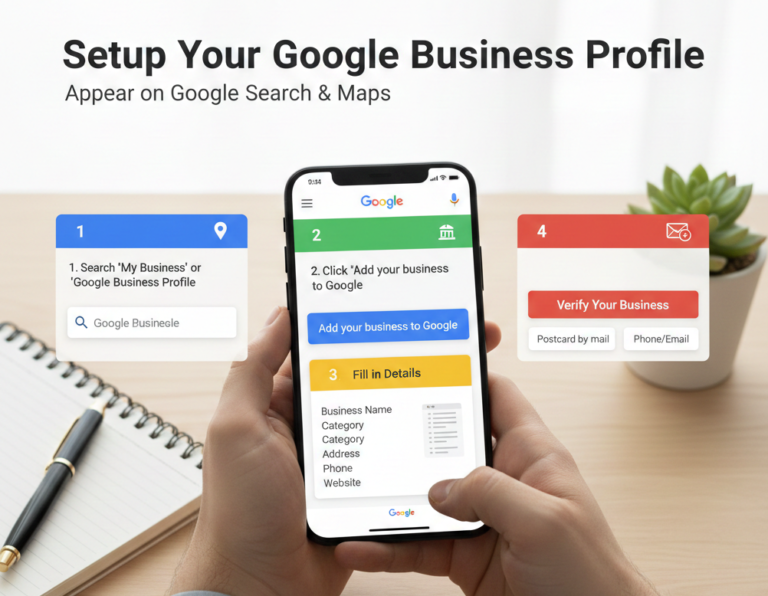
Step-by-Step: Setting Up Your Google Business Profile
- Go to Google Business Profile: Visit business.google.com and sign in with your Google account.
- Enter Your Business Name: Start typing your business name. If it’s new, you’ll see an option to “Add your business to Google.”
- Choose Your Business Type: Select “Online retail,” “Local store,” or “Service business” based on your model.
- Add Your Business Category: Be specific! This helps Google understand what you do.
- Enter Location Details (if applicable): If you have a physical store, enter your address. If you’re a service business that visits customers, you can list your service areas without a physical address.
- Add Contact Info: Include your phone number and website URL.
Verify Your Business: This is a crucial step! Google needs to confirm you are who you say you are. Verification methods can include a postcard by mail, phone, or email.
- Optimize Your Profile: Once verified, fill out your profile completely. Add business hours, photos, a detailed description, and services offered. The more information, the better.
Encourage Reviews: Positive reviews are gold for GBP! They boost your ranking and build trust. Always respond to reviews, both positive and negative.
A well-optimized GBP is often the first thing people see when they search for local businesses, and it directly influences “add me to search in Google” for local intent.
3. Google Search Console: Your Direct Line to Google
Google Search Console (GSC) is a free tool from Google that helps you monitor your site’s performance in Google Search results. It’s like having a direct channel to Google to understand how your site is seen.
Key Benefits of GSC:
- Submit Sitemaps: Tell Google about all the pages on your website.
- Monitor Indexing: See which of your pages Google has indexed and if there are any errors.
- Check Performance: See which queries bring users to your site, your average position, and click-through rates.
- Identify Issues: Get alerts about critical errors on your site (e.g., mobile usability problems, security issues).
Hashtags Used: #travelcouple #couplegoals #ancientruins #exploretheworld #wanderlust #travelphotography #instacouple #historylovers #digifyads (for branding).
Why it Works: It uses both specific Instagram couple hashtags and broader travel tags to reach different audiences.
Installing GSC is crucial for anyone serious about “add me to Google search.
Diving Deeper: Search Engine Optimization (SEO) for Ultimate Visibility
Now that the foundations are laid, let’s talk about SEO – the art and science of getting your pages to rank higher in search engines like Google. This is how you truly “add to me Google” in a meaningful way beyond just a basic listing.
1. Keyword Research: Understanding What People Search For
Before you write a single word, you need to know what your potential audience is typing into Google. This is where keywords come in.
- Identify Your Niche: What problems do you solve? What products do you offer?
- Brainstorm Seed Keywords: Start with broad terms related to your business (e.g., “digital marketing agency,” “web design,” “SEO services”).
- Use Keyword Research Tools: Tools like Google Keyword Planner (free), Semrush, Ahrefs, or Moz Keyword Explorer (paid) can reveal:
- Search Volume: How many people search for this term monthly?
- Keyword Difficulty: How hard is it to rank for this term?
- Related Keywords: Other terms people are searching for.
- Search Volume: How many people search for this term monthly?
Long-tail Keywords: Longer, more specific phrases (e.g., “best local SEO agency for small businesses”). These often have lower search volume but higher conversion rates.
Your goal is to find keywords that have a decent search volume but aren’t impossible to rank for. Incorporate these naturally throughout your content, ensuring you address searches like “add me to Google search not showing” with practical solutions.
2. On-Page SEO: Optimizing Your Website Content
This refers to all the optimizations you make directly on your website pages.
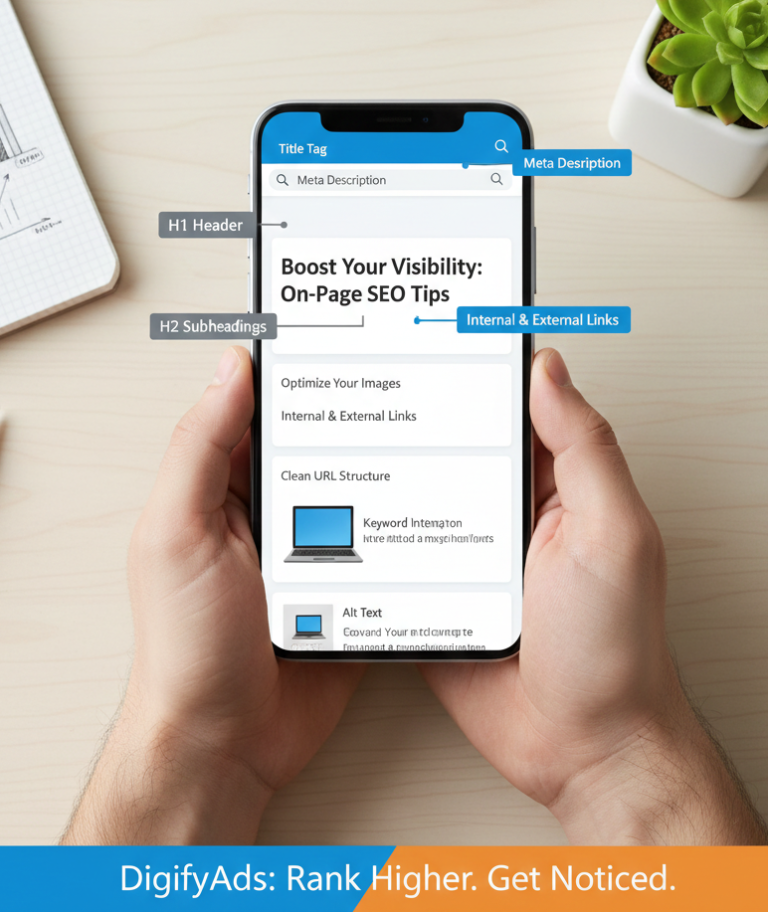
- Title Tags: This is the clickable headline in search results. It should be compelling and include your primary keyword.
- Meta Descriptions: The short summary under the title tag. Write it to entice clicks, including relevant keywords.
Header Tags (H1, H2, H3, etc.): Use these to structure your content logically. Your H1 should contain your main keyword.
- High-Quality Content: This is paramount. Google rewards content that is informative, comprehensive, engaging, and unique. Aim for depth and provide real value.
Keyword Integration: Weave your chosen keywords naturally into your content. Avoid “keyword stuffing,” which means cramming keywords unnaturally – Google will penalize you for it.
- Image Optimization: We need to optimize the images using the following important points
- Alt Text: Describe your images using relevant keywords. This helps Google understand the image and assists visually impaired users.
File Size: Compress images to ensure fast page loading times.
- Internal Linking: Link to other relevant pages within your own website. This helps Google crawl your site and spreads “link juice” (authority) around.
- External Linking: Link to credible, authoritative external websites where appropriate.
URL Structure: Keep your URLs short, descriptive, and keyword-rich (e.g., digifyads.com/how-to-add-me-to-google-search).
3. Technical SEO: The Hidden Pillars of Ranking
These are the backend optimizations that ensure search engines can effectively crawl, index, and understand your website.
- Mobile-Friendliness: Google uses mobile-first indexing, meaning it primarily uses the mobile version of your content for ranking. Your site must be responsive and perform well on mobile devices.
- Site Speed: Users (and Google) hate slow websites. Optimize images, leverage browser caching, and consider a Content Delivery Network (CDN) to speed up your site.
SSL Certificate (HTTPS): Ensure your website has an SSL certificate, making your site secure (HTTPS). Google favors secure websites.
- XML Sitemaps: An XML sitemap lists all the important pages on your website, helping search engines crawl it more intelligently. Submit it via Google Search Console.
- Robots.txt: This file tells search engine crawlers which pages or files they can or cannot request from your site.
Schema Markup: This is structured data that you add to your HTML to help search engines better understand the content of your pages. For example, you can use schema to tell Google that a page is a product, a recipe, or an event. This can lead to rich snippets in search results, making your listing stand out.
4. Off-Page SEO: Building Authority Beyond Your Website
This refers to activities done outside of your website to improve its search engine ranking.
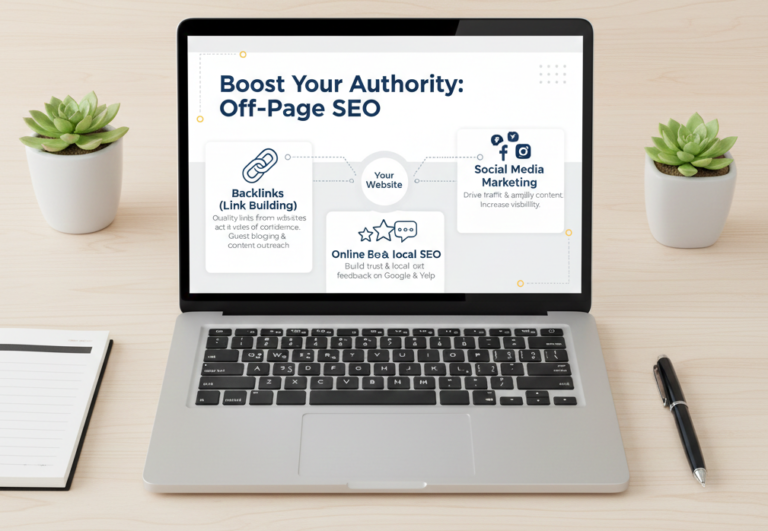
- Backlinks (Link Building): This is one of the most powerful ranking factors. Backlinks are links from other websites to yours. Google sees these as “votes of confidence.”
- Quality over Quantity: A few high-quality, relevant backlinks from authoritative sites are far more valuable than many low-quality ones.
- Quality over Quantity: A few high-quality, relevant backlinks from authoritative sites are far more valuable than many low-quality ones.
Strategies: Guest blogging, creating shareable content, broken link building, and directory submissions (relevant ones) are common tactics.
- Social Media Marketing: While social signals aren’t a direct ranking factor, social media can drive traffic to your site and amplify your content, indirectly leading to more visibility and potential backlinks.
Online Reviews: As mentioned with GBP, reviews on Google, Yelp, industry-specific sites, etc., are crucial for local SEO and building trust.
Beyond SEO: Other Avenues for Google Visibility
While SEO is fundamental, there are other ways to ensure you add me to Google effectively.
1. Google Ads (Paid Search)
If you need immediate visibility, Google Ads allows you to pay to appear at the top of search results for specific keywords.
- Targeted Audience: You can target specific demographics, locations, and interests.
- Instant Results: Unlike SEO, which takes time, Google Ads provides immediate traffic.
Budget Control: You set your daily or monthly budget.
Google Ads is a powerful way to accelerate your visibility while your organic SEO efforts mature.
2. Content Marketing: Becoming an Authority
Creating valuable content is at the heart of attracting and engaging your audience.
- Blog Posts: Regular, high-quality blog posts that answer common questions in your industry or offer solutions. This is where you leverage those long-tail keywords.
- Videos: YouTube is owned by Google, and video content ranks highly in search results. Tutorials, product reviews, and educational videos can significantly boost your visibility.
- Infographics: Visually appealing, shareable content that can attract backlinks and social shares.
Ebooks/Whitepapers: Offer in-depth guides in exchange for an email address, establishing your expertise.
Good content naturally addresses how to “add me to search get started” from an informational standpoint, making you a go-to resource.
Real-World Scenarios: Applying the Knowledge
Let’s consider how a new marketing professional or a small business might apply these principles to “add me to search Google.”
Scenario 1: A New Freelance Web Designer
- People Card: The designer should create a Google People Card with their name, “Freelance Web Designer,” location, and links to their portfolio website and LinkedIn. This directly addresses “how to add yourself on Google” for personal branding.
- Website: A stunning portfolio website showcasing their work, services offered, and client testimonials.
- Keyword Strategy: Target keywords like “affordable web design for startups,” “Squarespace designer for small businesses,” “freelance web developer [city name].”
- Blog: Write articles like “5 Essential Website Features for New Businesses” or “Choosing the Right CMS: WordPress vs. Shopify.”
- GBP: If they serve local clients, a service-area GBP is crucial.
Backlinks: Reach out to local business directories or collaborate with other freelancers (e.g., content writers) for cross-promotion.
Scenario 2: A Small Local Bakery
- GBP is Key: This is their bread and butter (pun intended!). Fully optimize their GBP with mouth-watering photos, accurate hours, menu, and special offers. Encourage customers to leave reviews.
- Local SEO Keywords: “Best bakery [city name],” “custom cakes [city name],” “vegan pastries near me.”
- Website: A simple website with their menu, online ordering options, and a blog section for recipes or behind-the-scenes content.
- Content: A blog post titled “Our Top 3 Holiday Cookie Recipes” could attract attention. Use images with optimized alt text for “bakery [city name] cookies.”
Social Media: Share daily specials, customer photos, and interact with the local community.
Troubleshooting: "Add Me to Search Not Showing"
It can be frustrating when you put in the effort, and your profile or website doesn’t appear. Here’s what to check if “add me to search not showing” is your problem:
- For People Cards:
- Location: Are you in India, Kenya, Nigeria, or South Africa? People Cards are limited to these regions.
- Language: Is your Google interface in English or Hindi?
- Signed In: Are you signed into your personal Google account?
- Web & App Activity: Is this setting turned on in your Google account?
- Mobile Device: Are you searching from a mobile phone?
Exact Search: Did you search for yourself, or “add me to Google”?
- For Websites and Businesses (General Visibility):
- Is Your Site Indexed?
Go to Google and type site:yourwebsite.com. If nothing appears, Google hasn’t indexed your site. Check Google Search Console for crawl errors or sitemap issues. - Fresh Content:
Is your content new and regularly updated? Stale content rarely ranks. - Technical Issues:
Check GSC for mobile usability errors, slow page speed, or security issues. - Keyword Competition:
Are you targeting keywords that are too competitive for a new website? Revisit your keyword research. - Backlinks:
Does your site have enough authoritative backlinks?
Patience: SEO takes time. It can take weeks or even months for new content or a new website to rank.
Frequently Asked Questions
1. How do I add myself to Google search results for free?
2. How long does it take to appear on Google search?
3. What is the difference between "Add Me to Google Search" and "Google My Business"?
4. Can I add my social media profiles to Google Search?
5. Why is my business not showing up on Google Maps?
6. Do I need technical skills to get my site on Google?
7. Should I focus on "add me to search" for personal branding or business branding?
8. What is a "Google knowledge panel"?
Final Thoughts from Digify Ads
Getting discovered on Google is not a one-time task; it’s an ongoing journey. It requires consistent effort, adaptation to Google’s evolving algorithms, and a genuine commitment to providing value to your audience.
From understanding how to “add me to Google” via a People Card or a robust Google Business Profile, to mastering the nuances of SEO, every step you take contributes to building your online empire. Don’t be overwhelmed by the details; focus on consistency and quality.
If you ever feel lost in the vast world of search engines, remember that Digify Ads is here to help. We specialize in transforming businesses like yours into online powerhouses. Let’s make sure you don’t just exist on Google, but truly shine!
Ready to boost your online presence?
Visit digifyads.com for a free consultation and let us craft a tailored strategy to get you discovered.